Installing the BEAM-TM-L
Packing contents
- TM-L hardware unit
- 1× antenna
- Cable tie (for battery fastening)
- Vertical mounting bracket: packed separately, required only if Dynamic Monitoring is enabled
Installation orientation
Installation orientation depends on whether Dynamic Monitoring is enabled. Review the table below before mounting the device.
| Mode | Installation requirement |
|---|---|
| Dynamic Monitoring ON | Sensor MUST be installed flat (horizontal). If wall-mounting, use the special vertical bracket (packed separately) to keep the sensor face parallel to the ground. Alarms only on X and Y tilt axes and all acceleration axes. Battery life will decrease. |
| Dynamic Monitoring OFF | Sensor can be installed in any orientation. No bracket required. |
ImportantIf Dynamic Monitoring is enabled and the node is wall-mounted without the bracket, X/Y axis readings will be inaccurate. Always install flat or use the supplied bracket.
Gateway setup (GW 3.6.1)
Complete the following before commissioning any TM-L nodes:
- Attach the LoRa antenna to the left port of GW 3.6.1.
- Power on the gateway. Connect to its Wi-Fi hotspot:
Ackcio_Beam_XXXX(password:[hidden on the public site]). - Open a browser and go to
http://192.168.0.10. Log in withadmin/[hidden on the public site].
Key differences when commissioning TM-L
The TM-L uses the same Nimbus 2.0 commissioning flow as other BEAM nodes, with two important differences:
- Cable: use a USB-C cable (not Micro USB) with the OTG adapter.
- Antenna: the LoRa antenna must be connected to the left port of GW 3.6.1 before starting. Also make sure the TM-L has its own antenna fixed on its port.
Battery
The TM-L uses a dedicated connector-type battery (2-pin XH2.54 mm male), different from the D-cell used in other BEAM Mesh nodes.
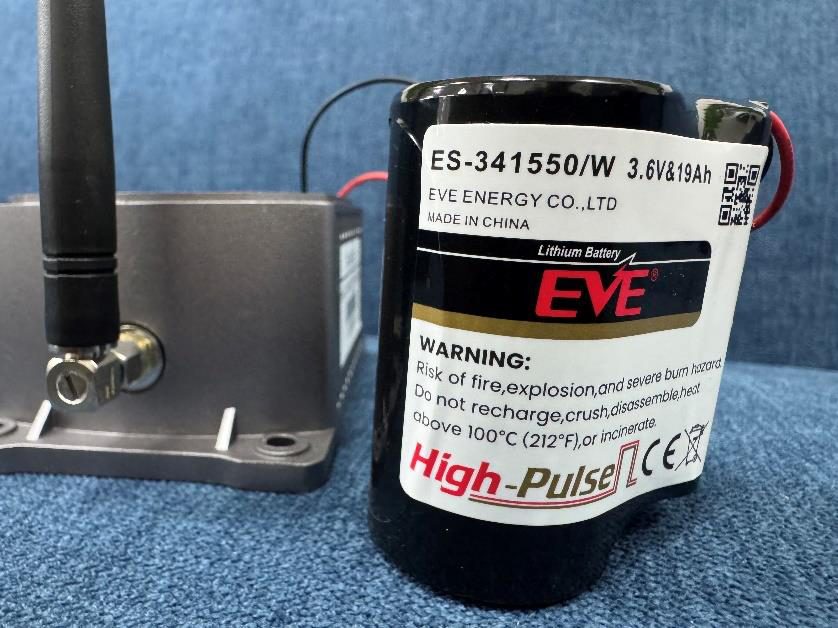
| Parameter | Specification |
|---|---|
| Nominal Voltage | 3.6 V |
| Capacity | 19 Ah |
| Connector | 2-Pin XH2.54 mm male |
| Max Continuous Current | >150 mA |
| Max Pulse Capacity | ≥400 mA |
| Operating Temperature | −40°C to +85°C |
| Chemistry | Lithium Thionyl Chloride (Li-SOCl₂) |
Approved battery models
- EVE ER34615 + SPC1550
- Tadiran TLP-93111-A
- Saft LSP 33600-20F
ImportantIf the battery is completely drained, the node stops operating and all untransmitted data is permanently lost. Replace promptly when a low battery alert appears on the Snape dashboard.
Battery replacement notes
- Replace within 1 month of a low battery alert appearing on the dashboard.
- Always use batteries manufactured within the last 3 months: Li-SOCl₂ batteries self-discharge during storage.
- Do not measure voltage directly with a multimeter without a load: Li-SOCl₂ always reads ~3.6 V regardless of state.
- There is no HPC in the TM-L, so there is no HPC deep-discharge risk. However, data loss on battery failure is permanent.
Device identification
Each BEAM TM-L unit has a unique label on its packaging:
- DevEUI: unique device identifier, equivalent to Ackcio’s 4-digit Node ID.
- Production Serial Number: for warranty and support tracking.
Did you know?Record each unit’s DevEUI and installed location for easy reference during maintenance and troubleshooting.