FAQ: Data management and Snape (Snape 1.0)
Q66What is the difference between Gateway Logs and Project Export?
- Gateway Logs: Up to 2 months of data; used for troubleshooting and diagnostics.
- Project Export: Complete historical dataset from project start; the primary client record.
Q67How do I export Project Data and Gateway Logs?
Follow the animated guides below for the Gateway logs and Project data export process:
Q68What is the limitation of Project Data Export?
Project Data Export is restricted to weekly intervals due to storage optimisation.
Q69What file formats are used for FTP and API uploads?
- FTP upload → CSV (.csv)
- API upload → JSON (.json)
Q70What is the FTP New File Creation setting?
- Enabled → Gateway creates a new file for every data push.
- Disabled → New data is appended to the existing file.
Q71What data output protocols does the Ackcio Gateway support?
- HTTP/HTTPS API: Push data to cloud services or custom applications
- FTP / FTPS: Upload CSV files to a server (FTPS encryption supported)
- Modbus TCP: Available on request for SCADA integration
- CSV local storage: Stored on Gateway memory card or internal Flash
Q72Does the Gateway support SFTP or API GET (pull) requests?
No. Currently only FTP Push (POST) and API Push are supported. FTPS is supported. SFTP and GET-based queries are not available.
Contact Ackcio at [email protected] if AMQP integration is required: availability updates will be communicated.
Q73Can FTP data pushes be scheduled to occur at a specific time?
Scheduled FTP push is on the development roadmap. At present, data is forwarded in real time. A workaround is to schedule the Raw2Data script execution server-side.
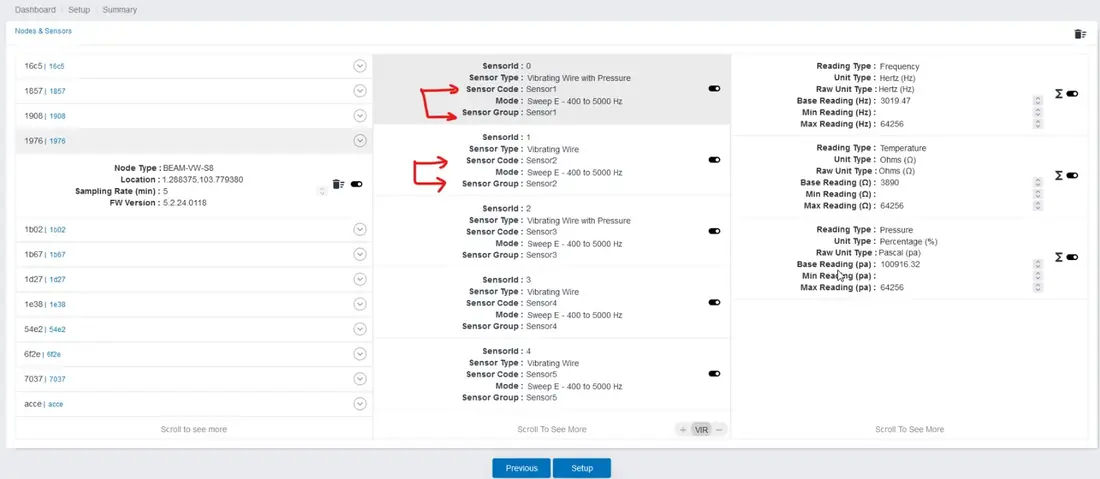
Q74What is the Sensor Group function in Snape?
Sensor Group consolidates data from multiple channels into a single output file, simplifying data management for multi-channel nodes.
Sensor Group changes take effect for new data only. Existing historical data retains the previous grouping.
Q75What parameters can be adjusted in Snape after commissioning?
- Sampling time
- Sensor code
- Node name
- Sensor group
- Formula assignment
Full recommissioning is not required for any of the above changes.
Q76How do I change the base reading for a node?
Base reading adjustments are made directly in Snape. Refer to the animated guide below:
Q77How do I clear a node's old memory from Snape?
Memory clearance can be performed for all nodes at once or individually. Refer to the guide below:
Q78How do I completely delete a node from Snape?
Node deletion is a two-step process. Follow the guides below carefully:
Q79What is a .dat file, and which sensor manufacturer uses it?
The .dat format is a proprietary file type used exclusively by Measurand. The Ackcio Gateway generates .dat files for Measurand sensors, but the format can only be processed by Measurand's own software.
Q80How does Snape handle readings that fall outside the configured min/max range?
Any reading within the configured min-max range is classified as VALID. Readings outside this range are flagged as errors and automatically routed to the error folder, keeping valid data clean and separate.