FAQ: Connectivity and network
Q48How does data transmission from nodes to the Gateway work?
Each node auto-assigns a transmission slot within a capped window (max 10 min for a full 50-node network). This explains the typical 1 to 5 minute delay between triggering a reading and seeing it in Snape. Once the Gateway receives data, it uploads to FTP/API instantaneously.
Q49Why is there a delay between a node reading and data appearing at the FTP server?
The delay occurs within the mesh: not at the FTP server. Data travels through the mesh to the Gateway; the Gateway then uploads in real time. The FTP server itself is not the bottleneck.
Q50What causes a node to disconnect from the network?
- RFI or EMI interference disrupting the mesh signal
- Physical obstruction between the node and its neighbours
- Auto-reset triggered by low battery voltage
- Node manually switched off/on
- Manual RESET button press
- Battery replacement (momentary power interruption)
Q51How does background synchronisation work on nodes?
When disconnected from the Gateway, nodes store all sensor readings in their onboard 8 MB Flash Memory. Upon reconnection, data syncs back to the Gateway progressively without overloading the mesh.
Q52How does background synchronisation work on the Gateway?
When internet connectivity is lost, the Gateway stores all received sensor data in its Flash Memory and syncs to the configured FTP/API endpoint in full chronological order once connectivity resumes.
Q53How do I improve reliability for a node with poor data transmission?
- Elevate the node or its antenna to improve line-of-sight coverage.
- Add a repeater node to extend mesh network reach.
- Run a Noise Test and Network Test in the Nimbus app.
- Confirm at least 2 neighbouring nodes with healthy RSSI (dBm) appear on the Network Test.
Q54Can Ackcio devices be deployed underwater?
No. Sub-GHz RF signals penetrate only a few inches through water. Ackcio devices are not designed for underwater applications.
Q55How do I verify a SIM card is working in the Gateway?
- Test the nano SIM on a mobile phone first to confirm internet access.
- Connect the cellular antenna firmly to the GSM port; mount it vertically.
- Select the correct APN for your country and mobile operator in Snape.
- If unsuccessful, try all APNs available for that operator.
- Click SAVE after any configuration change.
- If still failing, export Gateway logs and share with Ackcio support.
- Send a photo of the Gateway with all antennas attached.
Q56How do I interpret cellular signal strength on the Gateway?
The onboard modem reports signal strength on a scale of 0 to 31. Refer to the chart below:
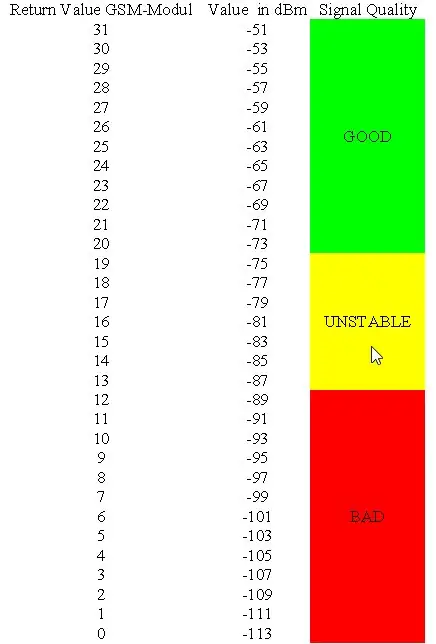
If signal is consistently poor, options are:
- Elevate the antenna (without relocating the Gateway)
- Relocate the Gateway to a better reception point
- Switch to a SIM provider with stronger local coverage
Q57Does the Gateway support automatic connectivity failover?
Yes. The Gateway can connect simultaneously via LAN, Wi-Fi, and Cellular and automatically switches between them based on availability, similar to a mobile device.
Q58What is the maximum number of nodes a single Gateway can manage?
A single Ackcio Gateway supports up to 50 nodes in a standard mesh deployment. For larger projects, additional Gateways are required, each managing their own node cluster.
Q59Can two Gateways share the same network and communicate with each other?
Gateways operate independently and do not communicate directly with each other. Each Gateway manages its own node cluster. Data from both Gateways can be consolidated at the server/platform level via FTP or API.