FAQ: HPC (Standalone)
Q16How do I check the D-Cell battery voltage on-site?
LiSOCl₂ D-Cell batteries have a unique characteristic: they always read approximately 3.6 V on a multimeter whether new or depleted, this is inherent to the chemistry. A direct multimeter reading is therefore unreliable.
- Always measure D-Cell voltage with a load applied (i.e., while the battery is installed and the node is running).
- Do not rely on open-circuit voltage measurements for D-Cell batteries.
- Check the manufacturing date printed on the battery, use only batteries made within the last 3 months.
Q17How do I check the HPC voltage on-site?
The HPC can be measured directly using a multimeter, no load is required (unlike D-Cell batteries).
- Locate the HPC test point on the PCB: it is the soldering point near the battery connector, indicated in the Ackcio HPC guide (orange circle marker).
- Alternatively, you can measure directly on the HPC itself using a multimeter.
If visiting a site after 1+ month of a node being in battery-low state, always check HPC voltage before replacing the D-Cell.
Q18Can a client replace the HPC themselves?
The HPC is not a user-serviceable component. Dismantling the PCB to replace the HPC will void the product warranty.
Contact Ackcio support at [email protected] to arrange an HPC replacement.
Q19Where can replacement HPC units be sourced?
Compatible HPC-1550 units are available from several suppliers. Contact Ackcio support at [email protected] before sourcing: only Ackcio should perform the replacement.
HPC specifications: 3.6 V / 3.9 V max charge, 2.5 V discharge end voltage, max pulse current 5 A, temperature range −40°C to +85°C.
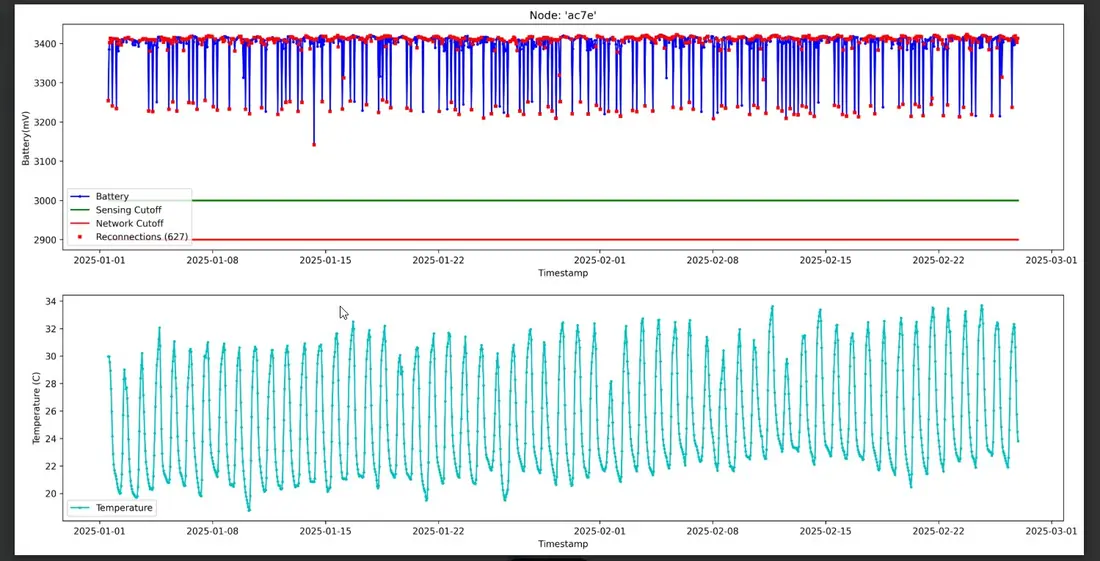
Q21Why do reboots occur on nodes, and what should be done?
Frequent reboots are typically caused by one of three issues:
- Insufficient battery: The battery cannot adequately power the system. Action: Replace with a fresh D-Cell manufactured within 3 months and monitor.
- Faulty or shorted sensor: Causes abnormally high current draw. Action: Inspect wiring and validate the sensor using the manufacturer's diagnostic tool.
- Node hardware failure: The node's power supply circuitry has failed. Action: Replace the node or inspect the battery connector.